


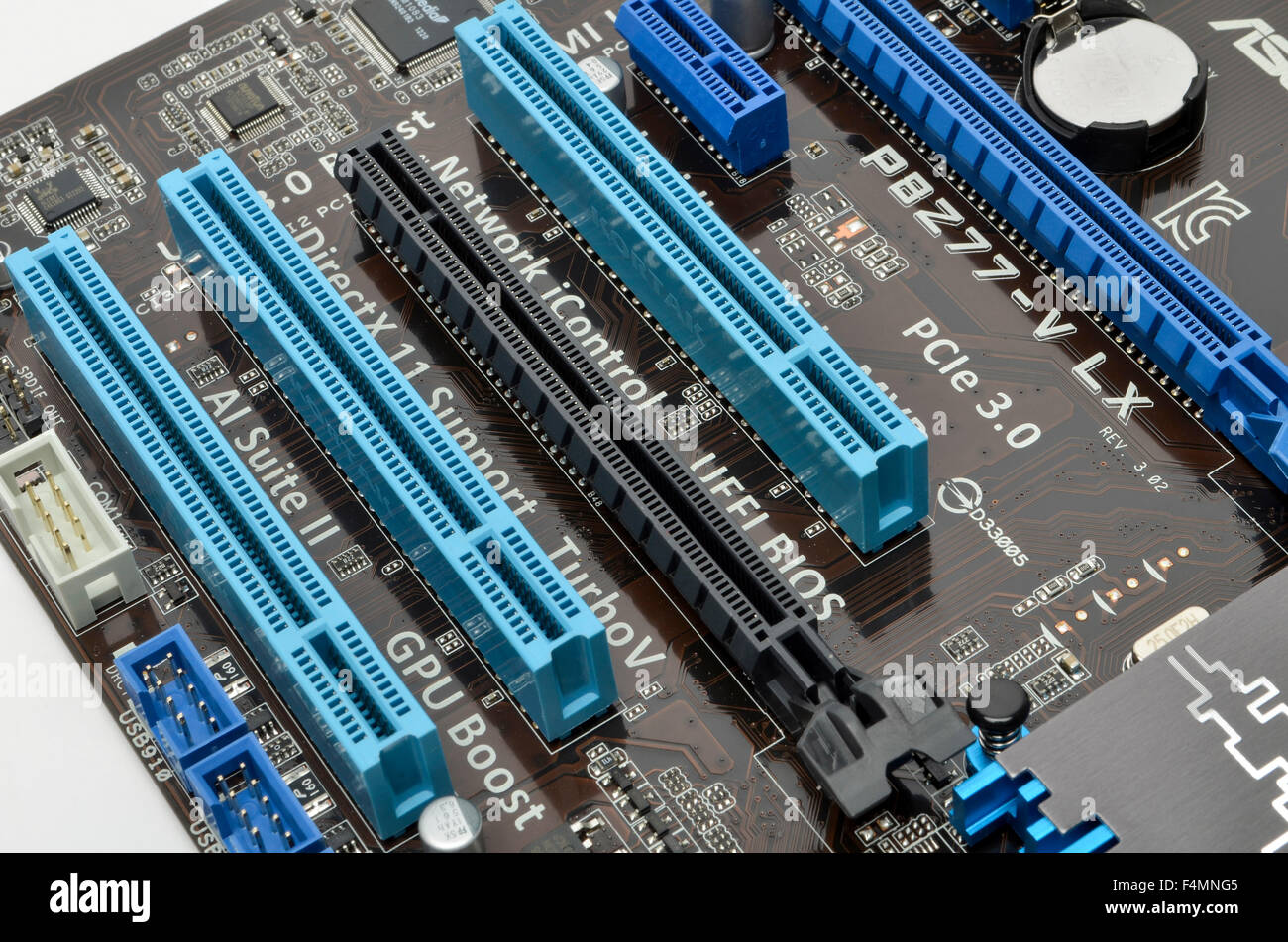
Expansion slot is one of the most important features of a computer motherboard, yet many users overlook its significance. Essentially, an expansion slot is a socket on your motherboard that allows you to add extra functionality to your PC. From graphics cards and sound cards to network adapters and storage controllers, these slots expand what your system can do.
In this guide, we’ll explore everything about expansion slots — types, uses, installation tips, and real-life examples — so you can understand how to maximize your PC’s potential.
What Is an Expansion Slot?
An expansion slot is a physical interface on a motherboard designed to accept an expansion card. This card can provide additional capabilities your computer didn’t have when it was first built. Think of it as a way to give your PC new “powers” without buying an entirely new system.
Motherboards typically come with several types of slots, including PCI, PCI Express (PCIe), and older standards like AGP. Each slot type has its own speed, size, and use case, meaning the card you choose must match the slot type on your motherboard.
Common Types of Expansion Slots
The most widely used expansion slots today include PCIe, PCI, and legacy AGP. PCIe slots, short for Peripheral Component Interconnect Express, are now the standard for modern graphics cards and high-speed devices. They come in different lane configurations, such as x1, x4, x8, and x16, with x16 offering the highest data transfer speeds.
PCI slots, once common in desktops, are still used for devices like sound cards and older network adapters. AGP, primarily for older graphics cards, is now mostly obsolete but important to know for anyone dealing with legacy systems. Understanding these slots is key to ensuring compatibility and performance for your PC upgrades.
Why Expansion Slots Matter
The power of an expansion slot lies in its ability to future-proof your computer. For instance, if you want to play the latest games or run graphic-intensive software, adding a dedicated GPU into a PCIe x16 slot transforms your system’s capabilities.
Similarly, installing a high-quality sound card or NVMe storage controller can significantly improve performance and user experience. Expansion slots allow you to customize your PC exactly how you need it, making them essential for gamers, content creators, and tech enthusiasts.
Real-Life Examples of Expansion Slot Uses
Consider Alex, a graphic designer who upgraded his workstation. By installing a high-end GPU in a PCIe x16 expansion slot, he drastically reduced rendering times for 3D projects. Before this upgrade, complex renders took hours; after, they completed in a fraction of the time.
Meanwhile, Sarah, a music producer, installed a professional sound card into a PCI expansion slot. This upgrade allowed her to use advanced audio interfaces with zero latency, creating a more professional recording environment at home. These examples illustrate how expansion slots can make a tangible difference in real-world scenarios.
Installing a Card in an Expansion Slot
Installing an expansion card is straightforward but requires care. First, power down your PC and open the case. Identify the correct expansion slot that matches your card. For PCIe cards, ensure you’re using the correct lane size (x1, x4, x8, x16).
Next, remove the metal bracket covering the slot at the back of the case. Align the card’s edge connector with the slot and press down until it clicks into place. Secure the card with screws if necessary, then close your case and boot up your system. Most modern cards are plug-and-play, meaning your operating system should automatically recognize the new hardware.
Troubleshooting Common Expansion Slot Issues
Even with proper installation, some users may face issues with their expansion slot upgrades. Common problems include unrecognized devices, loose connections, or driver conflicts.
If your card isn’t recognized, first ensure it is fully seated in the slot. Check that the motherboard supports the card type, especially if using older PCI slots. Updating device drivers from the manufacturer’s website often resolves recognition issues. Additionally, some slots share bandwidth, so using multiple high-speed cards may reduce performance unless the motherboard supports multiple full-speed lanes.
Expansion Slots and Gaming PCs
For gaming enthusiasts, expansion slots are vital. A high-end gaming rig typically requires a PCIe x16 slot for a powerful graphics card, possibly multiple slots for SLI or CrossFire setups. Additional PCIe x1 slots can house sound cards, capture cards, or Wi-Fi adapters to enhance gameplay experience.
Maximizing the use of expansion slots allows gamers to create tailored setups that outperform standard pre-built systems. It also provides flexibility to upgrade individual components without replacing the entire PC, saving time and money.
Future of Expansion Slots
The technology behind expansion slots continues to evolve. PCIe 5.0 and 6.0 are the latest standards, offering faster speeds and higher bandwidth to accommodate new high-performance devices. These advancements mean that tomorrow’s GPUs, storage devices, and AI accelerators will require modern slots to function optimally.
Manufacturers are also experimenting with smaller, specialized slots for ultra-compact systems, like laptops and mini-PCs, ensuring that expansion remains relevant even as devices become more compact.
Choosing the Right Expansion Slot for Your Needs
When selecting an expansion slot for your upgrade, consider the following: what device you are adding, the speed required, and your motherboard’s capabilities. High-performance GPUs demand x16 lanes, while smaller devices like network adapters often work fine in x1 slots.
Balancing your system’s power and slot availability is crucial. Some motherboards feature reinforced PCIe slots to support heavier graphics cards. Others offer multiple slots for redundancy, so future upgrades won’t be limited by space.
Maximizing Performance with Expansion Slots
Beyond choosing the right slot, optimizing your expansion slot use involves proper airflow, power supply considerations, and avoiding bottlenecks. High-end GPUs can generate significant heat, so installing them near case fans or in well-ventilated enclosures helps maintain performance.
Ensuring your power supply can handle additional devices is equally important. Many expansion cards, especially GPUs, require additional power connectors that must be supported to function correctly. Proper planning ensures that your PC runs smoothly and your upgrades provide the maximum benefit.
Expansion Slots in Everyday Computing
Even outside of gaming or professional use, expansion slots play a key role in everyday computing. For instance, a home office PC can benefit from a network card for faster internet or a capture card to record video meetings. These practical uses highlight how expansion slots offer versatility beyond high-end applications.
By understanding the capabilities and limitations of your motherboard, you can make informed choices about upgrades, keeping your system efficient and adaptable for years to come.
Read also:
expansion slot
xbox cloud gaming beta
addicitng games
addicting game